
How to Group Multiple Events into an Event Collection
Event Collections enables organizers to group multiple related events into a single, branded collection page. Instead of promoting each event individually, you can showcase a series of events from one centralized destination, making it easier for attendees to discover, browse, and register for events.
Whether you're organizing a conference series, workshops, training sessions, webinars, or recurring community events, Event Collections helps present them in a professional and organized way.
Benefits of Event Collections
Using Event Collections allows you to:
- Showcase multiple related events on a single landing page.
- Improve attendee discovery by grouping similar events together.
- Display both upcoming and past events in one place.
- Create a branded experience with custom images and organizer information.
- Share a single collection link instead of multiple event URLs.
- Embed the collection page on your own website for greater visibility.
Accessing Event Collections
- Log in to your Eventzilla account.
- From the Dashboard, click the Collections tab.
- Select Create New Collection.

Creating an Event Collection
Creating a collection is a simple two-step process.
Name & Events
Provide the basic information for your collection.
Collection Name
-
Enter a meaningful name that represents your event series.
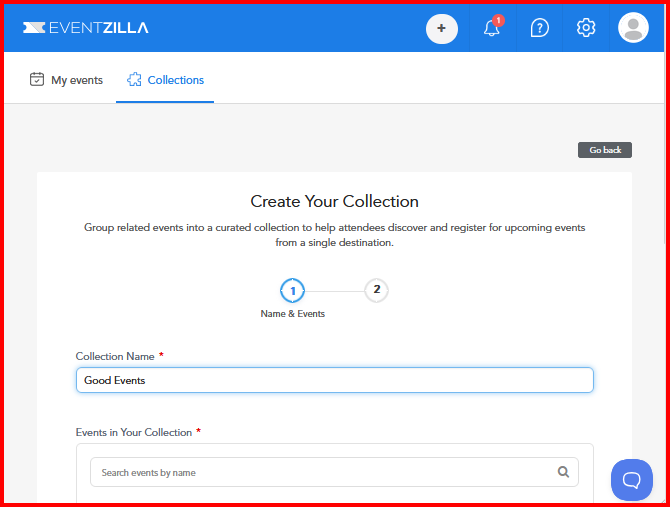
Events in Your Collection
- Search and select one or more events.
- You can include:
- Upcoming events
- Past events
- Multiple events can be added to the same collection.
After selecting your events, click Save and Continue

Step 2: Customize Your Collection
Customize the appearance and information displayed on the collection page.
Provide the following details:
- Organizer Profile – Select the organizer profile to display.
- Cover Image – Upload a banner image to personalize your collection.
- Collection Summary – Add a brief description explaining the purpose of the collection or event series.
Once completed, you can:
- Save Collection - To complete and add the collection
- Back - Go back to the previous page for any edits required

Collection Features
Each Event Collection supports the following customization options:
- Collection Name
- Organizer Profile
- Cover/Background Image
- Collection Summary or Description
- Multiple Past and Upcoming Events
- Save as Draft
- Publish when ready
What Attendees See
When a collection is published, attendees can view a professionally designed landing page that includes:
- Collection banner image
- Collection title and summary
- Organizer information
- Contact Organizer button
- Upcoming Events tab
- Past Events tab
- Social sharing options for:
- X (formerly Twitter)
Events within the collection are automatically displayed in chronological order, making it easy for attendees to find the next upcoming event.

Embed Collections on Your Website
Published Event Collections can be embedded directly into your organization's website or landing page. This allows visitors to browse your complete event series without leaving your website.
Need Assistance?
If you have any questions or need help creating or managing Event Collections, please contact the Eventzilla Support . Our support team is happy to assist you with any questions